
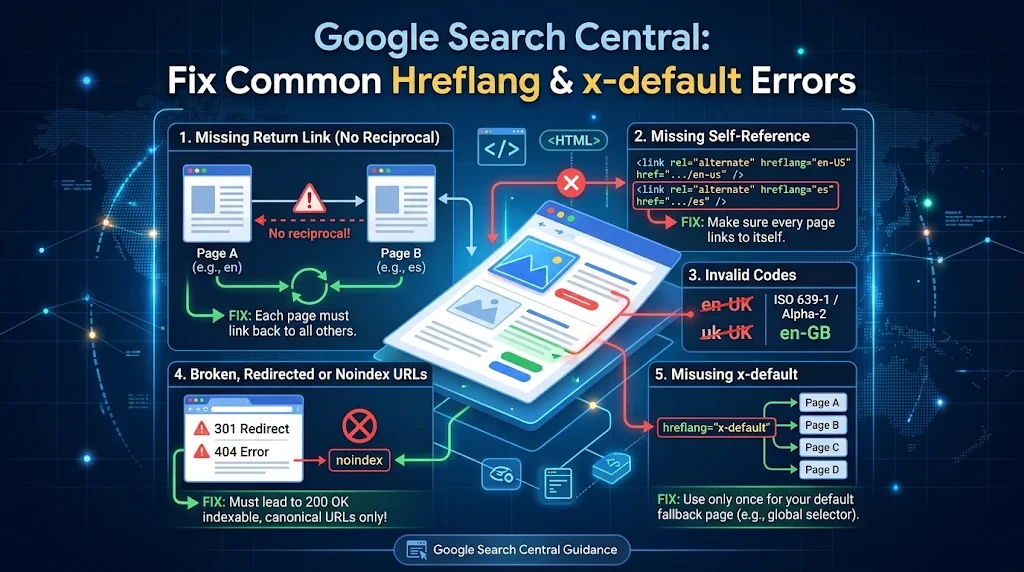
Google Search Central hreflang x-default guidance becomes especially important when a multilingual website has errors. Perhaps a crawler reports missing return links, a country selector redirects unexpectedly, or Google shows a different regional page than expected. The first step is to identify which part of the system is failing.
This troubleshooting guide is organized by symptoms and likely causes. It is intended for a website that already has some hreflang implementation. For a beginner overview, start with the [hreflang tags guide](<function H at 0x7f0aaee24fe0>) and return here when you have a specific issue to solve.
Problem 1: A crawler reports missing return links
Imagine the English page lists a German alternate, but the German page lists only itself. The relationship is incomplete. Google explains that alternate pages should point back to each other; otherwise the affected annotations can be ignored.
Open both pages, inspect their source, and compare the alternate URL sets. Add the missing English reference to the German page and confirm the German URL remains on the English page. Test the live output after clearing any cache.
Problem 2: x-default points to an irrelevant page
A common configuration mistake is to use the site homepage as x-default for every article and product. If a visitor searches for a specific product, a generic homepage may not help them complete the task. A matching neutral product page or suitable selector can provide a better experience.
Review the fallback URL for each content group. Ask whether the visitor can reach the equivalent information with minimal effort. If not, create a better fallback or consider whether x-default is needed for that group.
Problem 3: The fallback redirects in circles
Some international sites detect browser language and automatically redirect visitors. A fallback page may send someone to a regional page that immediately redirects back. This is frustrating for users and makes testing difficult.
Open the URL with a fresh browser session and several language preferences. Follow each redirect. Prefer an accessible selector with visible choices rather than a system that makes navigation impossible. Google also cautions that automatic locale adaptation can make alternate pages difficult to discover.
Problem 4: A language code looks right but is invalid
The common mistake en-UK illustrates why language and region codes should be checked carefully. The appropriate regional form for UK English is en-GB. Similarly, x-default should be written as the reserved value rather than invented variations such as default-en.
Compare your values against Google’s supported code guidance. Correct the code in every affected version, not just the page where the error was first noticed.
Problem 5: The tag appears in the page body
An SEO plugin or page builder may inject alternate links into the visible content rather than the HTML head. For an HTML implementation, Google expects the link annotations in a well-formed head section.
View the rendered source and locate the opening and closing head tags. If the annotations are outside that section, fix the template or integration. Do not assume that seeing the markup in a browser inspector means it is in the right place.
Problem 6: The canonical points to another language
A translated Spanish page may contain a canonical pointing to English because a template copied the English canonical. That can create confusing signals when Spanish is meant to be a separate indexable version.
Inspect the page’s canonical URL and the corresponding hreflang entries. For distinct translated pages, self-referencing canonicals are commonly appropriate. For true duplicates, the canonical decision may differ. Review the canonical URL generator and Google’s canonicalization documentation before making a sitewide change.
Problem 7: A translated page was removed
A business may retire its Italian page while keeping an old Italian hreflang entry in every other version. That annotation now points to a broken or redirected URL. Remove or update the stale reference across the entire affected group.
Also check the language selector and internal navigation. If the page is permanently gone, do not keep advertising it as an available alternate. A clean implementation should match the content that actually exists today.
Problem 8: Google still shows a different page
Correct hreflang markup helps Google understand localized alternatives, but it does not force a particular result for every user. Google may use other signals and may not index every page. Check whether the page is accessible, indexable, useful, and genuinely localized before blaming x-default.
Google Search Console can help with indexing and canonical checks. It does not provide a complete dedicated hreflang validation report. Combine Search Console with source inspection and a suitable crawler when investigating a large website.
A practical diagnosis sequence
Start with the exact affected URL. Confirm its response status, then inspect canonical markup, then check its hreflang set. Visit each alternate URL and compare reciprocal entries. Finally, open the x-default destination in a fresh session and test the user experience. This order separates page availability problems from annotation problems.
<link rel="alternate" hreflang="en" href="https://example.com/en/support/" />
<link rel="alternate" hreflang="es" href="https://example.com/es/ayuda/" />
<link rel="alternate" hreflang="x-default" href="https://example.com/support/languages/" />
Use the free hreflang generator when rebuilding a small alternate set. For recurring sitewide errors, fix the CMS template or data source rather than manually editing hundreds of pages. The technical SEO audit guide offers a broader process for tracking these issues.
Frequently Asked Questions
Why is Google ignoring my hreflang tags?
Possible reasons include missing return links, invalid codes, inaccessible destinations, or inconsistent canonical signals. Inspect the affected URL group.
Can x-default cause a redirect loop?
The annotation itself does not redirect visitors, but a badly configured fallback page can redirect in a loop.
Does Search Console show every hreflang error?
No. It does not offer a complete dedicated hreflang validation report.
Should I remove x-default if it points to the wrong page?
Correct the destination when a useful fallback exists. If no meaningful fallback exists, do not add an arbitrary one just to satisfy a tool.
Final takeaway
Treat hreflang x-default problems as specific technical or user-experience failures. Find the broken URL, code, return relationship, canonical, or redirect. Fix the source of the error and test the live pages again.
Leave a Reply