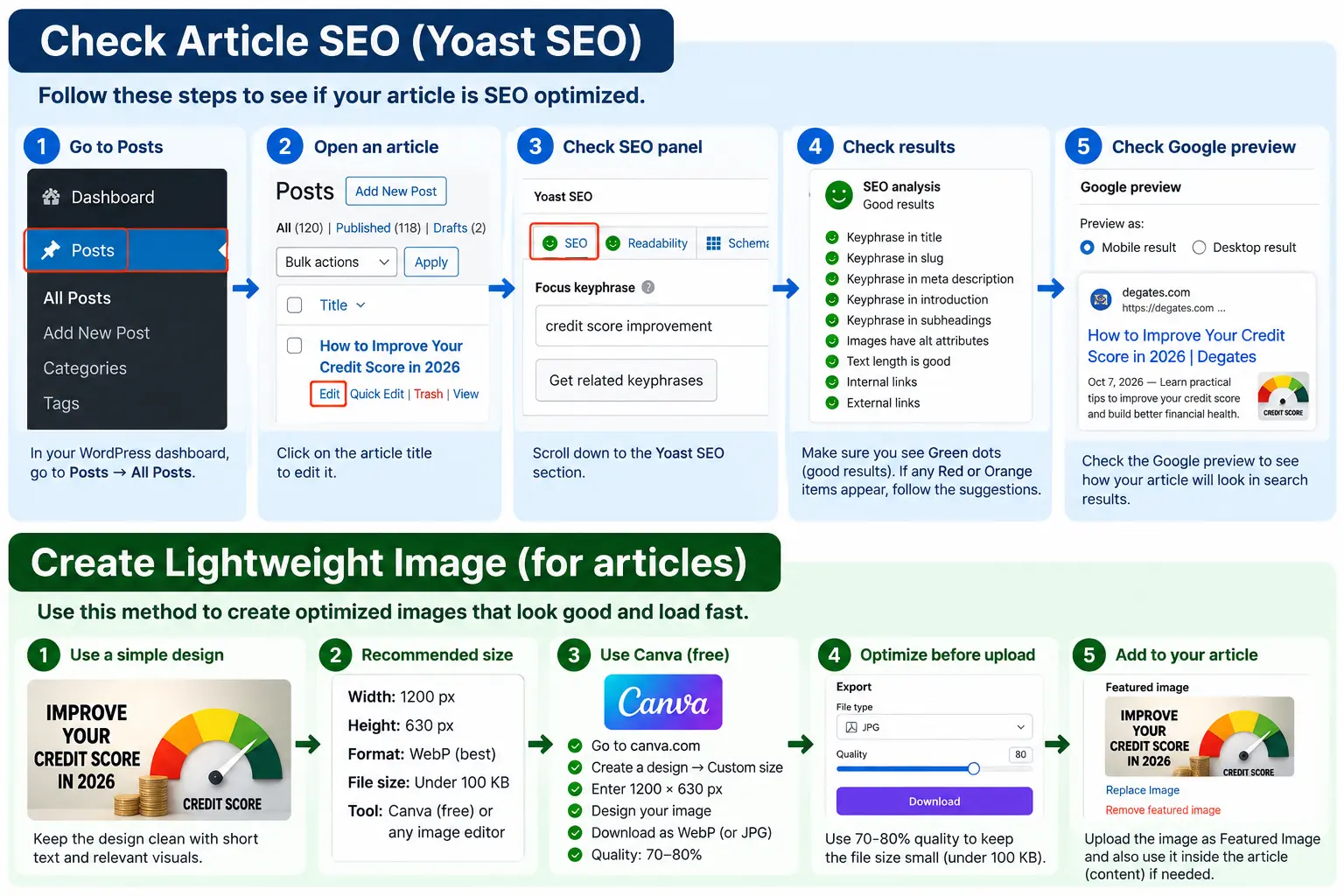
A website can look great, load reasonably fast, and contain useful content—and still struggle to get traffic from Google.
Sometimes the problem is obvious, such as pages that aren’t indexed. More often, it is a collection of smaller issues: weak page titles, confusing heading structures, duplicate URLs, missing internal links, poorly optimized images, or important pages that search engines have difficulty discovering.
That’s where an SEO audit becomes useful.
A good audit isn’t simply a long report filled with warnings. Its purpose is to answer three practical questions: Can search engines access and understand the website? Does each important page satisfy the right search intent? And what should be fixed first?
If you’re wondering how to audit a website for SEO, this guide walks through the process from technical foundations to individual page optimization.
What Is an SEO Audit?
An SEO audit is a systematic review of a website to identify issues that may affect its visibility in organic search.
Think of it as a health check for your website.
You examine how search engines interact with the site, how individual pages are optimized, how content is organized, and whether technical problems are making it harder for users or search engines to navigate the website.
A useful audit usually covers four broad areas:
- Crawling and indexing
- Technical website health
- On-page optimization
- Content and internal linking
You don’t necessarily need to fix every warning you discover. Some issues have a much greater impact than others. The real value of an audit comes from knowing which problems matter and in what order to address them.
1. Check Whether Google Can Find Your Pages
Before changing titles, rewriting content, or adding keywords, start with the most basic question:
Can Google actually access and index the pages you want to rank?
A beautifully optimized page has little search value if it cannot be crawled or indexed.
Start by checking your important URLs in Google Search Console. Look for pages that should be indexed but aren’t, unexpected exclusions, crawl problems, or indexing errors.
You should also review your site’s robots.txt file. A misplaced rule can prevent search engines from crawling sections of a website.
Then check your XML sitemap. It should primarily contain canonical, indexable URLs that you actually want search engines to discover.
For a small website, this process may only take a few minutes. For a large ecommerce or content site, indexing problems can require much deeper investigation.
2. Review Your Website Structure
A visitor shouldn’t need a map to understand your website.
Neither should a search engine.
Important pages should be accessible through a logical navigation and internal-link structure. If valuable content is buried several levels deep or has no internal links pointing toward it, discovery becomes more difficult.
During your audit, look at how the website is organized.
For example, a digital marketing website might follow a simple structure:
Home → Services → SEO Services → Technical SEO
This is easier to understand than a collection of unrelated URLs with no clear hierarchy.
Pay particular attention to orphan pages—pages that exist but receive few or no internal links from elsewhere on the site.
3. Audit SEO Titles and Meta Descriptions
Next, inspect your important pages one by one.
Every major page should have a descriptive title that clearly communicates what the page is about.
For example:
Weak title:Services | Company Name
Better title:Technical SEO Services for Better Search Visibility | Brand
The second version gives both users and search engines considerably more context.
Look for:
- Missing titles
- Duplicate titles
- Titles that don’t match page intent
- Unnaturally stuffed keywords
- Generic titles that say very little about the page
Then review the meta description.
A meta description isn’t simply a place to repeat your target keyword. Treat it as a short introduction to the page. It should give someone a reason to choose your result when it appears in search.
Also remember that Google may generate a different search snippet depending on the query. So write descriptions for humans rather than trying to force an exact snippet.
4. Check H1, H2 and H3 Headings
Headings make long pages easier to understand.
Your H1 should normally communicate the main subject of the page, while H2 and H3 headings divide the content into logical sections.
Don’t choose headings just because you want to insert another keyword.
Ask a simpler question:
If someone scanned only the headings, would they understand what this page covers?
For this article, for example, headings such as “Check Whether Google Can Find Your Pages” and “Audit SEO Titles and Meta Descriptions” tell the reader exactly what each section is about.
That’s much more useful than repeatedly inserting “SEO Audit” into every heading.
5. Evaluate the Content Against Search Intent
This is one of the most important parts of an audit—and one that automated tools can’t fully judge on their own.
Suppose somebody searches:
how to audit a website for SEO
They’re probably looking for instructions, not a sales page containing three paragraphs and a “Buy Now” button.
The content should therefore satisfy that informational intent.
For every important page, ask:
Does the content actually answer what the searcher came for?
Look for pages that are thin, outdated, overly repetitive, or written primarily for search engines rather than readers.
Also check whether the page demonstrates genuine usefulness. Examples, explanations, screenshots, original experience, comparisons, templates, data, or practical instructions can often make a page much more valuable than simply making it longer.
A 900-word page that completely answers the query can be better than a 3,000-word article padded with generic information.
6. Inspect URLs and Canonical Tags
URLs should be understandable wherever practical.
A URL such as:
example.com/services/technical-seo/
gives users far more context than something like:
example.com/page?id=782
You don’t need to redesign every existing URL just to make it shorter. Changing established URLs unnecessarily can create additional work and redirect problems.
Instead, pay particular attention to new URLs and genuinely problematic structures.
You should also inspect canonical tags.
Canonicalization becomes particularly important when multiple URLs contain identical or very similar content. The canonical helps indicate which version should be treated as the preferred URL.
Incorrect canonicals can point search engines toward the wrong page, so they deserve attention during a technical audit.
After choosing the preferred URL, use the canonical tag generator to format its HTML link tag. Check the target URL separately before implementation.
7. Check Internal Links
Internal linking is one of the easiest areas to overlook.
Imagine publishing an excellent service page and then barely linking to it anywhere else on your website.
You’ve created the page, but you’ve done very little to establish its relationship with the rest of the site.
During your website audit, find opportunities to link related content naturally.
For example, an article about performing an SEO audit could link to relevant pages about:
- Technical optimization
- On-page optimization
- Website audit tools
- Keyword research
- Schema markup
The anchor text should make sense in the sentence. You don’t need to use an exact-match keyword every time.
Internal links should primarily help visitors move to the next useful resource.
8. Find Broken Links and Redirect Problems
Broken links create frustrating dead ends.
Check both internal and external links for URLs that no longer work. Internal 404s should usually be corrected by updating the link, restoring the page where appropriate, or redirecting an old URL when there is a genuinely relevant replacement.
Also look for redirect chains.
If URL A redirects to B and B redirects again to C, it’s usually cleaner to update relevant internal links so they point directly to the final destination.
Be careful with redirects, though. Sending every deleted page to the homepage is not a meaningful solution.
9. Audit Images
Images affect more than appearance.
Large, poorly optimized files can make pages heavier, while missing alternative text can reduce accessibility and remove useful context.
Review:
- Image file sizes
- Appropriate formats
- Missing ALT attributes
- Descriptive filenames where practical
- Images that are much larger than their displayed dimensions
ALT text should describe the image when the image needs a textual alternative. It shouldn’t become another place to stuff keywords.
Instead of:
SEO SEO audit best SEO website audit tool
write something meaningful, such as:
Website audit dashboard showing technical issues
That’s useful to a person as well as understandable in context.
10. Review Mobile Usability and Page Performance
Your website needs to work well on a phone, not merely shrink to fit one.
Open key pages on a mobile device and actually use them.
Can you read the text comfortably? Are buttons easy to tap? Does navigation work? Do intrusive elements cover the content? Does the layout shift while the page loads?
Performance should also be reviewed using appropriate measurement tools.
Large images, unnecessary scripts, excessive third-party code, slow hosting, render-blocking resources, and poor caching can all contribute to a slow experience.
Don’t optimize purely to chase a perfect score.
The goal is a website that feels fast and stable for real visitors.
11. Check Structured Data
Structured data can help search engines better interpret certain types of content and may make eligible pages suitable for specific search features.
Depending on the website, relevant markup might include structured data for products, organizations, breadcrumbs, articles, local businesses, or other supported content types.
During an audit, check whether existing markup is valid and whether it accurately represents what’s visible on the page.
Don’t add schema simply because a plugin provides a checkbox for it.
Use markup that genuinely matches the content.
12. Look for Duplicate and Competing Pages
Sometimes the biggest competitor for a page is another page on the same website.
You may find several articles targeting nearly identical topics.
For example:
/seo-audit-guide/
/how-to-do-seo-audit/
/complete-website-seo-audit/
Having multiple pages isn’t automatically a problem, but if they serve essentially the same purpose, they may create unnecessary duplication and make your content strategy confusing.
Decide whether each page serves a distinct search intent.
Where appropriate, overlapping content can be consolidated into a stronger resource.
13. Review Your Most Important Pages First
Not every issue deserves equal attention.
This is where many audits go wrong.
A report may show hundreds of warnings, but fixing an insignificant warning across 500 pages may be less valuable than correcting an indexing problem affecting five important service pages.
Prioritize issues based on factors such as:
Critical: Pages can’t be crawled, indexed, or accessed correctly.
High priority: Problems affect important commercial pages, content quality, canonicalization, site structure, or user experience.
Medium priority: Improvements that strengthen optimization but aren’t blocking performance.
Low priority: Minor cleanup tasks with limited practical impact.
This turns an audit from a list of errors into an actual action plan.
14. Use an SEO Audit Tool—But Don’t Follow It Blindly
An audit tool can save an enormous amount of time.
It can quickly check repeatable elements such as metadata, headings, links, image attributes, canonical tags, directives, structured data, and other technical signals.
But a tool doesn’t understand your business in the same way you do.
It may flag something that is intentional. It may also give a technically correct recommendation that has very little business value.
Use automated analysis to find potential problems, then apply human judgment to decide what actually needs fixing.
That’s also the philosophy behind the tools we’re building at Degates: make website problems easier to detect and understand, while keeping the final decision in human hands.
A Simple Website SEO Audit Checklist
When auditing a website, you can use this condensed checklist:
- Confirm important pages can be crawled and indexed.
- Review robots.txt and the XML sitemap.
- Check titles and meta descriptions.
- Review H1, H2 and H3 structure.
- Match each important page to its intended search intent.
- Inspect canonical tags.
- Find broken internal and external links.
- Improve internal linking between relevant pages.
- Review image sizes and ALT text.
- Test important pages on mobile.
- Investigate performance and Core Web Vitals.
- Validate relevant structured data.
- Look for duplicate or overlapping content.
- Identify orphan pages.
- Prioritize problems before making changes.
- Re-audit after implementing fixes.
An audit shouldn’t end when you export a report. The real work begins when the findings are prioritized and implemented.
To extend your review to AI search, follow the GEO audit website checklist for crawler access, content credibility and AI mention and citation checks.
How Often Should You Audit a Website?
There isn’t one schedule that works for every website.
A small business site that changes only occasionally may not need the same audit frequency as an ecommerce store with thousands of changing product URLs.
A fresh audit is particularly useful after:
- A website redesign or migration
- Major URL changes
- A significant decline in organic traffic
- Publishing or removing large amounts of content
- Changes to templates or site architecture
- Unexpected indexing problems
For an actively managed website, lighter ongoing monitoring combined with periodic deeper reviews is usually more useful than waiting for problems to accumulate.
Final Thoughts
Learning how to audit a website for SEO isn’t about memorizing a hundred technical checks.
Start with the fundamentals.
Make sure search engines can access the right pages. Give those pages clear titles and structure. Create content that genuinely satisfies the visitor’s intent. Connect related pages with useful internal links. Keep the site technically clean, mobile-friendly, and easy to navigate.
Then use audit tools to make repetitive checks faster.
Most importantly, don’t treat every warning as equally urgent. A useful SEO audit should leave you with a clear answer to one question:
What should we improve next?
That’s what turns an audit from a report into a strategy.
Leave a Reply