PREFERRED URL · FREE SEO TOOL
One clear URL for similar pages.
Use this free canonical URL generator to create an HTML link tag for your preferred page address. Preview, copy or download it instantly. No account, API or payment required.
← All free SEO tools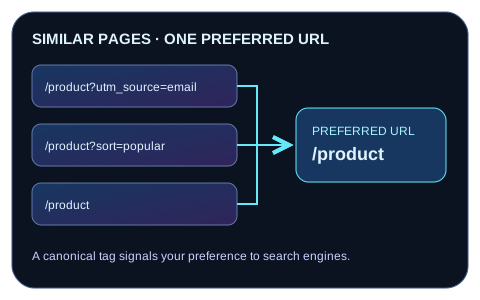
Live canonical tag preview
Preferred address in the generated tag
Your preferred URL will appear here.This is code for your page’s head, not a redirect. The tool never changes this page’s canonical tag or uploads your URL.
How to use the Canonical URL Generator
- Choose the preferred URL for a group of duplicate or substantially similar HTML pages. Select the accessible, indexable page you want visitors to find.
- Enter its full address, including the correct scheme, hostname, path and any meaningful parameters. Review the normalized URL and generated HTML.
- Copy the tag or download the HTML snippet. Put one consistent
rel="canonical"link inside the<head>of each relevant page, including the preferred page itself. - If Yoast or another SEO plugin already provides a canonical, configure it there. Replace or correct the existing value instead of adding a second canonical tag. Check the rendered page source after publishing.
The generator validates URL syntax and escapes the HTML attribute. It does not fetch the destination, inspect redirects, check indexability or decide which page Google will select.
Canonical tag examples
A self-referencing canonical on the preferred guide page:
<link rel="canonical" href="https://example.com/guides/canonical-urls/">If a tracking URL serves the same content, its canonical may point to the clean guide URL above. Keep parameters when they identify genuinely different content. A meaningful query string must be escaped for HTML:
<link rel="canonical" href="https://example.com/catalog?category=books&language=en">Common canonical URL mistakes
- Pointing every page to the homepage when the content is different. Choose an equivalent preferred page for each duplicate group.
- Leaving two conflicting canonicals from a theme, SEO plugin and manual snippet. Maintain one consistent declaration.
- Using a fragment, relative address, broken target, redirect chain, blocked page or a page marked
noindexwithout checking the intended indexing behavior. - Removing useful parameters, changing path case or adding/removing a trailing slash without confirming the real preferred URL.
- Sending translated pages to an unrelated language version. Coordinate canonical selection with your language annotations.
A canonical is a signal, and search engines can choose a different URL. It does not redirect visitors or guarantee indexing or rankings. See Google’s canonical URL guidance.
Related free SEO tools
Connect language versions with the Hreflang Tag Generator, then review titles and social tags with the Meta Tag Generator. For shop pages, use the Product Listing Schema Generator.
Canonical URL FAQs
What is a canonical URL?
It is the preferred address you identify for duplicate or very similar content. A canonical link tag tells search engines your preference; the search engine still decides which URL to use.
Should every page use a self-referencing canonical?
A self-reference can make the preferred address explicit when that page is the version you want indexed. If the page is a duplicate, use the relevant preferred URL instead. Review each page’s purpose rather than applying one destination everywhere.
Does a canonical tag redirect visitors?
No. Visitors remain on the URL they opened. Use an appropriate redirect when you retire a page and want visitors moved to its replacement.
Can the canonical contain query parameters?
Yes, when the parameters belong to the preferred address. Remove tracking or sorting parameters only if those URLs are duplicates of the chosen page. This tool preserves query parameters and escapes ampersands in the HTML output.
Can I point to another domain?
The tag can reference an absolute URL on another domain, but only do so deliberately for equivalent content and the appropriate publication arrangement. The generator cannot verify the relationship or predict whether search engines will accept it.
Where do I put the canonical tag in WordPress?
If your SEO plugin supports a custom canonical setting, use that setting. Otherwise add the declaration through your site’s existing head-management mechanism. Do not paste a live link tag into a body content block or duplicate a canonical already supplied by WordPress, Yoast or your theme.
Is my URL sent to a server?
No. Validation, preview, copying and downloading happen in your browser. The tool has no external dependencies and does not request the supplied URL.