MOVE URLs WITH CONFIDENCE · FREE SEO TOOL
Build clear Apache redirects, one URL or a whole list.
Create exact 301 or 302 rules for your root .htaccess file. Validate your URLs, answer a simple math check, then preview, copy or download. Everything runs in your browser.
← All free SEO toolsRedirect code preview
Validation updates as you edit. Code appears after the math check and generation. Editing redirect settings clears stale code and requires generation again.
Apache 2.4+ with mod_rewrite and .htaccess overrides enabled. Install in the document-root .htaccess before WordPress rules. Nginx does not read this file. This tool does not change your website or verify destinations.
What Is a 301 Redirect?
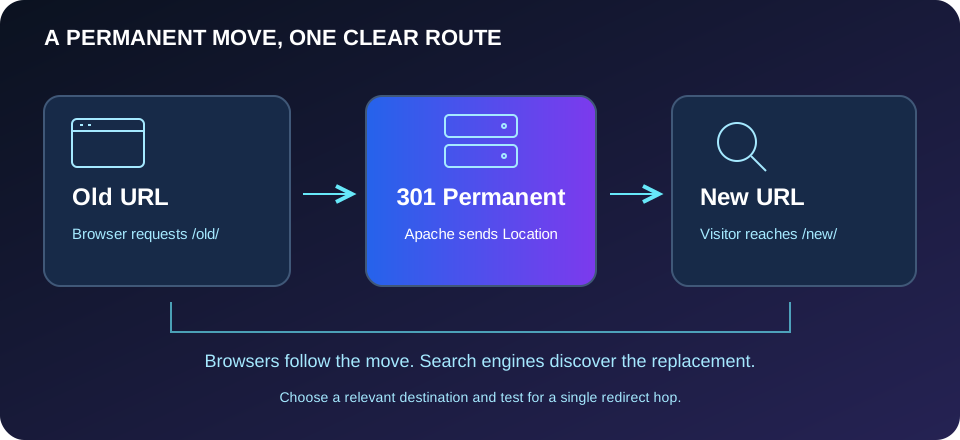
A 301 redirect is an HTTP response that tells a browser a resource has moved permanently. The server returns a new address in the Location header, and the browser requests that address. It is useful when you replace a page, change a permalink or move content to a new domain. Visitors following an old bookmark can reach the relevant replacement instead of a missing page.
A redirect is different from a canonical tag: it moves visitors to another URL rather than suggesting a preferred version while leaving the current page accessible. Use this 301 redirect generator when the old address should stop serving its original content. Choose a destination that satisfies the same visitor intent, not an unrelated homepage simply because it exists.
Search engines can process redirects when updating their understanding of a site, but a redirect does not guarantee rankings or immediate indexing. Keep the replacement accessible, maintain useful content and update internal links to the final address. The generated snippet handles the redirect response; it cannot repair a missing destination or decide which page is most appropriate.
How to Use This Generator
Enter the complete old and new HTTP or HTTPS URLs, including meaningful paths and query parameters. Select a permanent 301 or temporary 302 response. The preview uses browser-normalized addresses, so check the hostname, port, path case and trailing slash. Fragments are rejected because browsers do not send them to the server. Regex symbols in a URL are escaped as literal characters, not interpreted as wildcard instructions.
Choose a query policy deliberately. Preserve keeps incoming parameters and appends them when the destination already has a query. Replace uses only the destination query, intentionally removing the incoming values. Old addresses containing parameters match that exact query string, including its order. An old address without parameters matches all queries on its path. Answer the addition question and select Generate Redirect Code to see the validated snippet.
301 vs 302 Redirects
Use 301 for a lasting move, such as a retired article with an equivalent replacement. Use 302 when the destination is temporary and the original address is expected to return. Permanent redirects can be cached, making mistakes harder to observe after correction. Test your mapping with 302 before switching to 301 when you are still reviewing the destination.
How to Add Redirects to .htaccess
This htaccess redirect generator produces Apache mod_rewrite rules for a document-root .htaccess file. Confirm that your host runs Apache 2.4 or newer, enables mod_rewrite and permits the necessary overrides. Back up the existing file, then merge the snippet before the WordPress rewrite block. Keep WordPress’s managed rules intact; do not replace the entire file with the downloaded snippet.
Test the old URL’s status and Location header, then open the destination. Check both HTTP and HTTPS versions where applicable. If the site returns a server error, restore the backup and review the error log with your host. Nginx uses different configuration directives and does not process .htaccess. CDN redirects and proxy TLS settings also need separate review; this tool does not generate Nginx configuration.
Bulk Redirects and Site Presets
The bulk 301 redirect generator accepts up to 200 old/new pairs per batch, separated by a tab or a spaced arrow. Start with a small reviewed list. Duplicate source URLs and overlapping query-free mappings are blocked, so each old address has an unambiguous rule. Cross-domain destinations are supported, but install each rule where its old hostname is actually served.
Optional HTTPS and www presets use a fixed hostname and preserve paths and queries. Choose a preferred host that resolves correctly and has a valid certificate. Behind a reverse proxy, the server’s HTTPS state may differ from the visitor’s connection; ask your host to adapt those rules rather than enabling a preset blindly.
Common Mistakes and Redirect Loops
A loop occurs when a URL returns to itself or two rules send requests back and forth. This 301 redirect code generator checks the supplied mappings and presets for cycles and warns about chains. Existing theme, plugin, server or CDN redirects are outside that check. Remove conflicting rules and prefer one hop to the final page. Update canonical tags and hreflang annotations when addresses change.
Redirect Generator FAQs
Does generation install the redirects?
No. This htaccess 301 redirect generator creates text locally. Copying or downloading does not modify WordPress or your server.
Is the math CAPTCHA secure?
No. It is a simple browser-side deterrent that can be bypassed. It is not authentication, rate limiting or server protection.
Can I copy after the question refreshes?
Yes. Refreshing the question does not invalidate generated code. Changing redirect inputs does, so regenerate after edits.